

Troubleshooting — the panel
The InvAmp button is not on the Tools tab
- Restart Inventor. Add-ins are loaded only at start-up.
- Open Tools → Add-Ins. Make sure InvAmp is loaded and Load Automatically is ticked.
The panel is missing but the add-in is loaded
Press InvAmp on the Tools tab; it shows and hides the panel. If the panel was dragged off-screen, use Inventor's View → User Interface to reset the window layout.
A page is missing from the icon bar
It is probably hidden. Open Home → Settings and look at the Panels group.
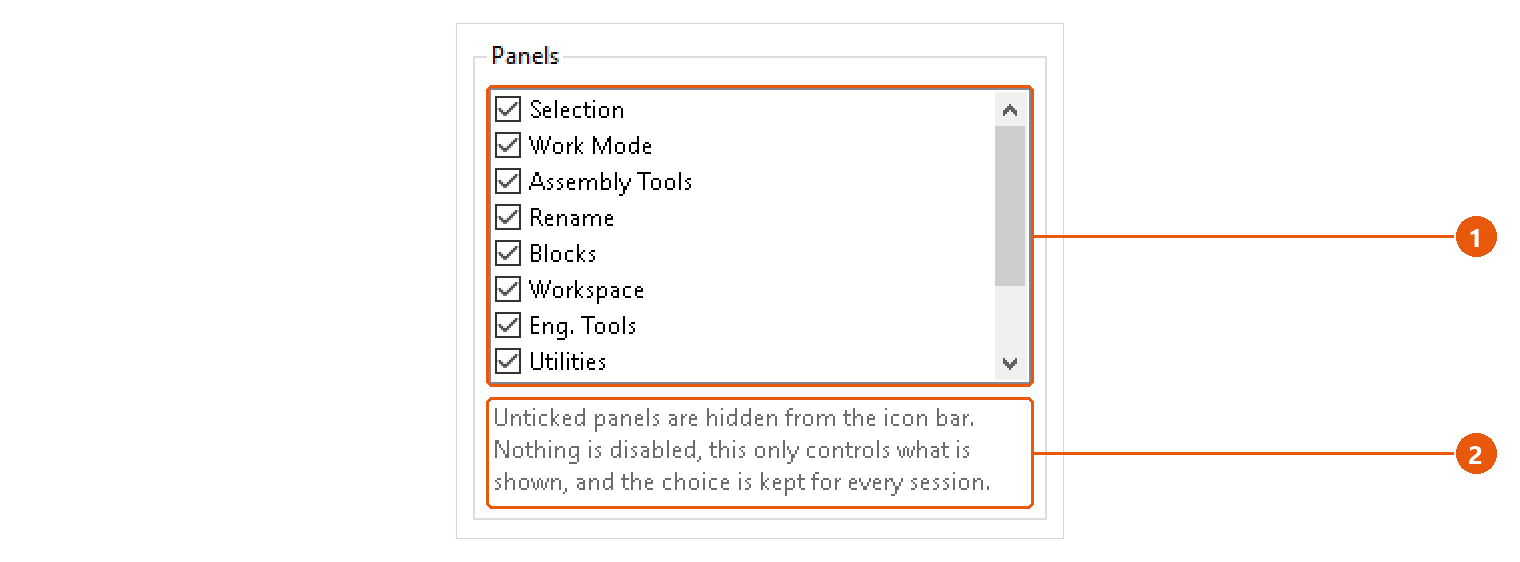
- Tick the missing page in the list 1. It appears in the icon bar at once.
- Nothing was disabled while it was hidden 2: the page and its settings are just as you left them.
A page says "This page could not be loaded."
The page failed while it was being built. The message names the page and the reason. The rest of the panel keeps working. Restart Inventor; if it happens again, send the log (see below).
Inventor seems frozen during a long run
Batch exports, nesting and the assembly checks do their work inside Inventor. A progress window keeps Inventor painted and offers a cancel button. On a large assembly, Windows may still call Inventor "not responding"; wait for the run to finish.
Tip:Hover over a page's icon to check which page it is before you hide or look for it.