

BOM — bill of materials
BOM lists the open assembly's components with their properties, previews and masses, and exports the list to Excel or Google Sheets.
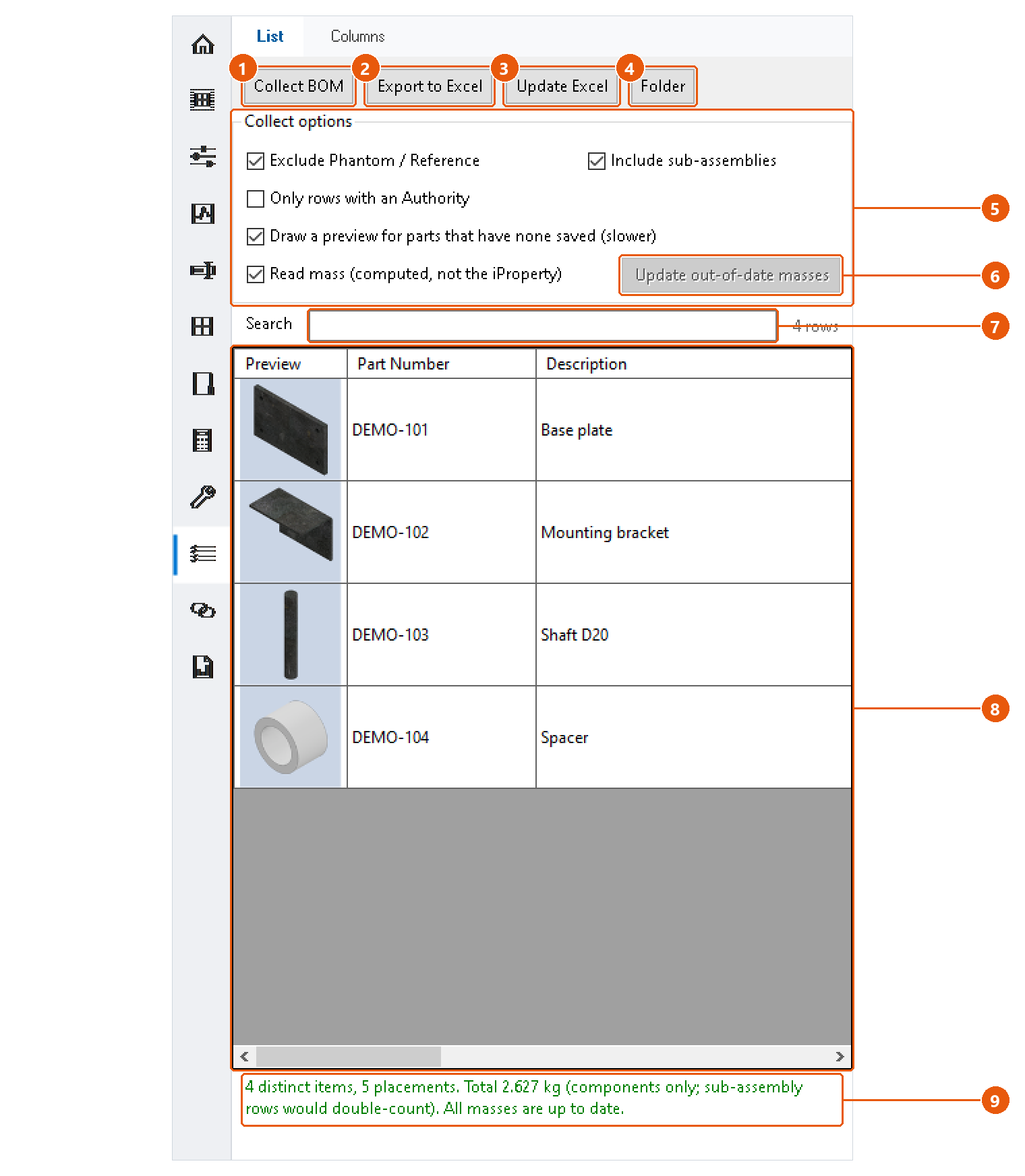
Collect the BOM
- Open the assembly and click BOM in the icon bar, then the List tab.
- Set the collect options 5:
| Option | Effect |
|---|---|
| Exclude Phantom / Reference | Leaves out components whose BOM structure is Phantom or Reference. |
| Include sub-assemblies | Lists the parts inside sub-assemblies as rows of their own. |
| Only rows with an Authority | Keeps only components whose Authority property is filled in. |
| Draw a preview for parts that have none saved | Renders a preview where the file carries none. Slower. |
| Read mass | Reads the mass computed from the geometry, not the stored iProperty. |
- Press Collect BOM 1.
Components are de-duplicated by file: a part used three times is one row with a quantity of three. The status line 9 gives the number of distinct items and placements, and the total mass.
Work with the list
- Type in Search 7 to show only the rows that contain that text.
- Double-click a row in the list 8 to select that component in Inventor.
- The columns are those of the Columns tab.
Check the masses
With Read mass on, InvAmp flags masses it does not trust: out of date, overridden in iProperties, or missing. The Mass check column names each affected row.
Press Update out-of-date masses 6 to have Inventor recompute those documents. They are not saved: save them yourself to keep the new mass on disk.
Note:With sub-assemblies included, the total counts only components, because a sub-assembly's mass already contains its parts.
Export
- Press Export to Excel 2.
- Choose where the BOM goes: Excel or Google Sheets.
- For Excel, choose the file name and folder. The workbook opens after export if Open the workbook after export is ticked on the Columns tab.
Update Excel 3 writes the same workbook again without asking. Folder 4 opens the folder of the last export.
For Google Sheets there are two cases:
- With a Google account set up in Settings, the BOM is uploaded into your Google Drive as a sheet. Update Excel updates that same sheet, so a link you already shared keeps working.
- Without one, the workbook is saved into your Google Drive folder on this computer, and Drive syncs it.
If any mass is not trustworthy, InvAmp asks before exporting.