
Rename — rename or duplicate a part with its drawing
Rename gives a part or an assembly a new name and takes its drawing along, so the drawing still shows the renamed model. Duplicate writes a copy instead.
Choose what to rename
- Open the assembly and select the component in the browser or the graphics window. With nothing selected, InvAmp uses the active document.
- Click Rename in the icon bar, then the Rename tab.
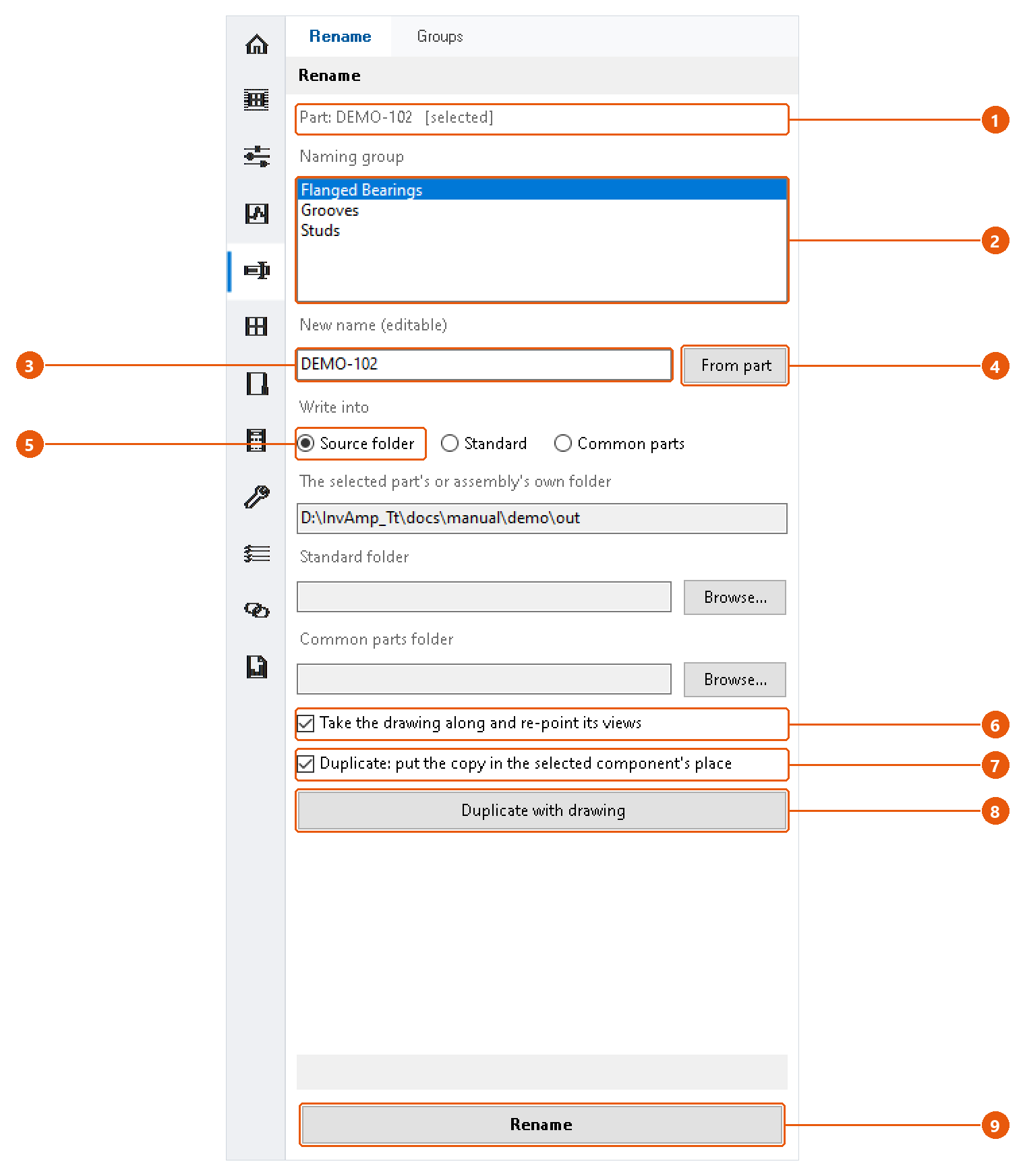
- Check the source line 1. It names the part or assembly InvAmp will work on, and whether it came from the selection.
Choose the new name
The name box 3 fills itself, and you can edit it:
- Pick a naming group 2 to get the group's next name, for example
FLB_001. - Select another part in Inventor to get that part's current name, ready to change a character or two.
- Press From part 4 to put the part's own name back.
Once you type in the box, selecting parts in Inventor no longer overwrites it.
Choose where the files go
Pick a destination 5:
| Option | Folder |
|---|---|
| Source folder | The part's or assembly's own folder. |
| Standard | A folder you set with Browse.... |
| Common parts | A folder for parts shared across machines, set with Browse.... |
Rename
- Tick Take the drawing along and re-point its views 6 to rename the drawing too.
- Press Rename 9.
- Confirm the summary.
InvAmp saves the model under the new name. With the drawing option on, it also saves the drawing under the new name and points its views at the renamed model. The original files stay on disk, so a mistake can always be undone by hand.
Note:The open assembly switches to the renamed file at once, but Inventor does not mark the assembly as changed and may not ask you to save it. Save the assembly yourself; otherwise it opens the old file, which is still on disk, the next time.
Duplicate
- Leave the name box untouched to get the next free name in the family, or type a name.
- Tick Duplicate: put the copy in the selected component's place 7 to swap the component for the copy.
- Press Duplicate with drawing 8 and confirm.
The original and its drawing are not touched. If the copy was swapped in, save the assembly to keep it.
Note:Duplicating an assembly copies only the assembly file. The copy uses the same parts as the original, so changing one of them changes both assemblies.
Note: A taken name, or a character Windows does not allow in file names, stops the run.